Langchain A2A with Entra Authentication
My test of trying to implement Agent to Agent (A2A) via LangChain with Entra authentication.
Repository link
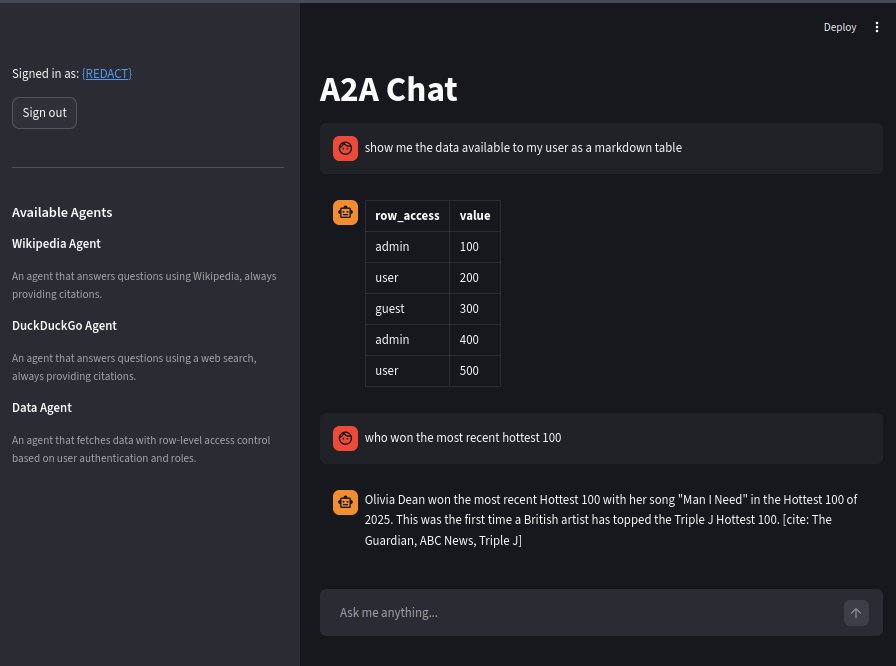
Structure
a2a/
├── infra/
│   ├── main.tf              # App registration, roles, assignments
│   ├── variables.tf          # UPNs, redirect URIs
│   └── outputs.tf            # Client ID, secret, tenant ID
├── src/
│   ├── agents/
│   │   ├── wiki/             # Wikipedia agent + card
│   │   ├── duck/             # DuckDuckGo agent + card
│   │   └── text_agent/       # Data agent with row-level access
│   ├── client/
│   │   ├── common.py         # Shared A2A tool factory
│   │   ├── orchestrator_agent/  # CLI orchestrator
│   │   └── streamlit_app/    # Streamlit UI + auth
│   ├── a2a_server/
│   │   ├── base.py           # Starlette server + routing
│   │   ├── auth.py           # JWT validation + middleware
│   │   ├── text_executor.py  # LangChain ↔ A2A bridge
│   │   └── types.py          # Streaming event types
│   └── util/
│       ├── settings.py       # Pydantic settings from .env
│       └── config.py         # LLM configuration
└── pyproject.toml            # uv project with entry points
About
I wanted to know a few things
- How does A2A work
- How does Authentication with A2A (Entra AD)
- How do I pass Authentication claims to a tool
- How do I restrict access to certain Agents via AD group
- How do I autodiscover agents
- How do I ensure that I don’t discover agents that I don’t have access to.
- How do I stream responses
- How do I keep conversation history
Here’s what I ended up building
| Agent | Endpoint | Access Level | Purpose |
|---|---|---|---|
| Wikipedia Agent | /wikipedia | Public | Search Wikipedia with citations |
| DuckDuckGo Agent | /duckduckgo | agent.caller role required | Web search with citations |
| Data Agent | /data | Public - row level filtering based on authorization (user) and admin role (data_fetch_admin.caller) | Fetch data rows based on user role |
Quick Start
Setup Terraform
This is required if you want to test anything authentication related.
- Ensure that you have the azure-cli and terraform-cli installed.
- Set the
agent_caller_upnsanddata_fetch_admin_caller_upnsfor the user principal names that you want to be added to the various roles.
Run terraform apply to set up the application registration, application roles and add the roles to the users.
To extract the protected azure_client_secret run terraform output -raw azure_client_secret
Run Python Code
- Add the environment variables from the previous steps to your environment (a .env is available at root)
uv syncto install the requirements, then run the A2A server and whichever clients you want to test out.
| Feature | Command |
|---|---|
| CLI client | uv run a2a-orchestrator |
| Streamlit client | uv run a2a-client |
| A2A Server | uv run a2a-server |
How it works
Auto Agent Discovery
I expose an /agents endpoint that returns a list
of agent cards
based on what the user has access to, this prevents models trying to call agents that they have no access to (
DuckDuckGoAgent)
from starlette.applications import Starlette
from starlette.requests import Request
from starlette.responses import JSONResponse
from starlette.routing import Route

from agents import duck_agent_card, text_agent_card, wikipedia_agent_card

AGENT_CALLER_ROLE = "agent.caller"
agent_cards = [wikipedia_agent_card, duck_agent_card, text_agent_card]


async def list_agent_cards(request: Request) -> JSONResponse:
  roles = getattr(request.user, "claims", {}).get("roles", [])
  restricted_names = {duck_agent_card.name}
  visible = [
    c for c in agent_cards
    if c.name not in restricted_names or AGENT_CALLER_ROLE in roles
  ]
  return JSONResponse([card.model_dump(mode="json", exclude_none=True) for card in visible])
app = Starlette(
  routes=[Route("/agents", list_agent_cards)],
  # ...
)
Connecting to agent
Simplifying things drastically, a basic example of how to create an agent as a tool that can be fed into the langchain orchestrator agent.
import uuid

from a2a.client import Client as AgentClient
from a2a.client.client_factory import ClientFactory, ClientConfig
from a2a.types import (
  AgentCard,
  Message,
  Part,
  TaskArtifactUpdateEvent,
  TextPart,
)
from httpx import AsyncClient as HttpxClient
from langchain.agents import create_agent
from langchain_core.tools import tool


async def create_client(cards: list[AgentCard], http_client: HttpxClient) -> AgentClient:
  # simplified
  client = await ClientFactory.connect(
    cards[0],  # pick one of your client cards returned from /agent
    client_config=ClientConfig(httpx_client=http_client))
  return client


def make_message(text: str) -> Message:
  return Message(
    role="user",
    message_id=str(uuid.uuid4()),
    parts=[Part(root=TextPart(text=text))],
  )


@tool
async def wiki_agent(query: str, client: HttpxClient) -> str:
  """Search Wikipedia for information."""
  parts = []
  async for _, event in client.send_message(make_message(query)):
    if isinstance(event, TaskArtifactUpdateEvent):
      for part in event.artifact.parts:
        if isinstance(part.root, TextPart):
          parts.append(part.root.text)
  return "\n".join(parts) or "No results."


agent = create_agent(tools=[wiki_agent])
Streaming responses
Every agent server uses a LangChainAgentExecutor (defined in src/a2a_server/text_executor.py) to bridge a LangChain
agent to the A2A protocol. The executor converts a LangChain astream_events stream into A2A EventQueue events so
that clients receive real-time updates as the agent works.
Explained
Langchain events get mapped to A2A actions.
| LangChain event | A2A action | Description |
|---|---|---|
on_tool_start | TaskStatusUpdateEvent | Notifies the client that a tool call has begun, including the tool name and input. |
on_tool_end | TaskStatusUpdateEvent | Notifies the client that a tool call has finished, including the output. |
on_chat_model_stream | TaskStatusUpdateEvent | Streams each token of the LLM response to the client as it is generated. Tokens are also accumulated locally for the final artifact. |
on_custom_event | Delegated to _handle_custom_event() | A hook for creating a custom event type with an arbritary data dictonary for nonstandard replies (e.g. Wikipedia or sub-agent A2A streams). |
Once the streaming is complete it sends the full accumulated text as an A2A TaskArtifactUpdateEvent
along with a status completed, failed, or canceled.
Row Level Security Changes
To support row level security I need to build the data-agent and its tools via
get_text_agent(is_authenticated, roles) before executing the users command.
from langchain_core.tools import BaseTool, tool
from pandas import DataFrame

example_frame = DataFrame(
  {
    "row_access": ["admin", "user", "guest", "admin", "user"],
    "value": [100, 200, 300, 400, 500],
  }
)


def make_data_fetch_tool(is_authenticated: bool, user_roles: list[str]) -> BaseTool:
  """Create a data fetch tool with row-level access control."""

  allowed = ["guest"]
  if is_authenticated:
    allowed.append("user")
  if "data_fetch_admin.caller" in user_roles:
    allowed.append("admin")

  @tool
  def fetch_data() -> str:
    """Fetch data from the dataset. Returns rows the current user is allowed to see based on their access level."""
    filtered = example_frame[example_frame["row_access"].isin(allowed)]
    return filtered.to_string(index=False)

  return fetch_data
Entra configuration
Entra configuration is managed by Terraform and sets up two roles.
App role used instead of entra group for two reasons
- I have no intention of passing around a massive JWT containing all a users groups
- I will never hit the 200 JWT group limit of MASL
Authentication
Standard MSAL stuff